Free Download for Windows

View an ad to download for free

Mireia Fernandez Cristia

Updated 11 months ago

Flowchart creator for programming students

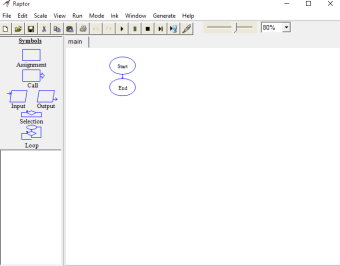
RAPTOR - Flowchart Interpreter is a free, Windows-based multimedia program to simplify programming basics. Its core mission is to help you visualize algorithms through a unique environment where programming logic is represented via flowcharts, rather than traditional text. This makes abstract concepts more tangible and easier to grasp for students and beginners.

Top Recommended Alternative

RAPTOR - Flowchart Interpreter's strength is allowing you to trace execution paths and understand program flow far more intuitively than using written pseudocode or conventional languages. This visual approach is especially beneficial for you in introductory courses, helping you to grapple with both syntax and logic simultaneously without such overwhelming complexity.

A student’s bestfriend

RAPTOR - Flowchart Interpreter's core appeal is its visual algorithm execution. You build programs by dragging symbols, and as you run your flowchart, it highlights active steps and displays variable values in real-time. This step-by-step feedback is invaluable for debugging, allowing you to identify logical flaws directly within the visual representation. Minimal, flexible syntax, borrowing from languages like C and Pascal, further reduces your overall load as a beginner.

The app also helps you progress with different modes for varying understanding. You start in Novice mode, using a single global namespace for simplicity. As you advance, the Intermediate mode introduces procedures and subcharts for modular programming and parameter passing. An Object-Oriented (OO) mode supports advanced paradigms. This tiered approach allows you to gradually build complexity without being overwhelmed, ensuring a structured learning path.

While it is an excellent learning tool for learners, it still has some notable limitations. Its primary drawback is being Windows-exclusive, creating a hurdle for you on macOS or Linux, often requiring workarounds. Additionally, you might find its visual design outdated compared to modern software. It also offers limited code generation capabilities and lacks a built-in tutorial, making initial use less intuitive for beginners alike.

An overall useful tool

RAPTOR - Flowchart Interpreter helps you visualize algorithms easily, offering visual execution and variable feedback, simplifying programming basics. Its tiered modes guide your learning, creating accurate algorithms. However, you'll find it Windows-exclusive with an outdated interface. It also lacks a built-in tutorial and sometimes struggles to generate full code, which might hinder your advanced learning path despite its initial ease. Still, it’s a useful program for anyone learning programming.

Mireia Fernandez Cristia

Mireia Fernández has over a decade of experience as an editor, with a focus on software reviews, tutorials, and gaming guides. Her background in technology and long-standing passion for video games shape her clear and practical style when analyzing tools and trends.

  • Pros

    • Easy to download and use
    • Visualizes algorithms and traces execution step-by-step
    • Creates successful and accurate algorithms for beginners
    • Minimal syntax requirement
    • Different modes
    • Supports common programming constructs
    • Provides feedback on variable states during execution
    • Open-source
  • Cons

    • Exclusively on Windows
    • Visually outdated interface
    • Limited video playback functions
    • Lacks a built-in tutorial
    • May not generate full, runnable code at times
 0/1

App specs

  • License

    Free

  • Version

    2025
  • Latest update

  • Platform

    Windows

  • OS

    Windows 8.1

  • Language

    English

  • Downloads

    182.6K

    Last month's downloads

    • 1.3K
  • Size

    53.52 MB

  • Developer

Program available in other languages


Free Download for PC

View an ad to download for free


User reviews about RAPTOR - Flowchart Interpreter

3.7

1 reviews

Add review

Main reviews for you

  • Anonymous user

    Windows users especially programmers are really lucky to be able to have an opportunity to have this software in their PC or laptop system.With this software, IT programmers students and professionals will be able to have better visualization of their algorithms and better tracing of the execution through this flowchart.

More

You may also like

Alternatives to RAPTOR - Flowchart Interpreter

Explore Apps

Latest articles

Laws concerning the use of this software vary from country to country. We do not encourage or condone the use of this program if it is in violation of these laws.
Softonic

Is RAPTOR - Flowchart Interpreter safe?

100/100

Score result: Clean

This file passed a comprehensive security scan using VirusTotal technology. It is safe to download.

  • Virus free
  • Spyware free
  • Malware free
  • Verified by Security Partners

    VirusTotal logo

Scan Info

Last scan
Tuesday, March 4, 2025
Scan provider
VirusTotal · Full report

File Integrity

File
raptor_avalonia.msi
SHA256
26a27ad473d5f841e6dfcd3a319ca30273edb035f06417ec1f3a9902d219170d
SHA1
4bb45d37e45c47620efbb5302dc9eaa9e77bc106

Softonic security commitment

RAPTOR - Flowchart Interpreter has been thoroughly scanned by our advanced security systems and verified by industry-leading partners. This file comes from the official developer and has passed all our security checks, showing no signs of viruses, malware, or spyware. For more information, visit our Security and Trust Center